Find the places that want your vending machines.
Foxfind searches Google Maps for offices, gyms, dealerships and hotels in your area, checks that each one suits your machines, finds the right email and sends a short, personal pitch from your own mailbox, with follow-ups that stop when they reply.
Free for 14 days, with 50 credits and 250 emails. You approve every email.
Recorded in Foxfind with an invented business, Harborline Vending. The companies, people and emails in these videos are made up; the map is Google Maps.
Every venue on Google Maps
Offices, gyms, dealerships, hotels and more, through Google’s official Places API.
Checked one by one
The AI reads each website and says whether the place suits your machines, and why.
Sent from your mailbox
Short, plain emails with follow-ups, from your own address, at a safe pace.
Stops when they reply
The reply lands in your inbox, and that venue gets nothing more from the agent.
The usual way
Finding locations is the slow part of vending.
Machines can be bought and routes planned. A yes from the person who runs a building takes searching, calling and chasing, on top of keeping every machine stocked.
Driving around
You can see the building, but not who manages it. A card left at reception rarely reaches the person who decides.
Cold calling
Front desks screen calls, and the person who signs off on a machine is rarely the one who picks up.
Lists and locators
Bought lists are seldom local or current, and a locating service chooses the places for you.
How it works
Four steps, then Foxfind keeps going.
Set it up once. Run discovery again whenever you want more places; the agent keeps writing, sending and following up.
Tell the AI what you want
Write one sentence about your machines and the places you’re after. The assistant sets up an agent: what to search for on Google Maps, where, what makes a good fit, and a brief for your emails.
- Searches written the way Google Maps understands them, like “office building” or “car dealership”
- A description of a good fit that you can edit, such as people on site all day and no café next door
- Anything it doesn’t know, like your phone number, is left as a marked gap. It never makes up facts.
Draw the area on the map
Drag a box over the neighborhoods you serve. Name it, stretch a corner, add another. Your route decides the map, not a ZIP code list.
- Draw as many areas as you cover: downtown, an industrial park, the next town over
- Each area is searched for every kind of place on your list
- Change them any time; the next run uses the new map
Run discovery and see who fits
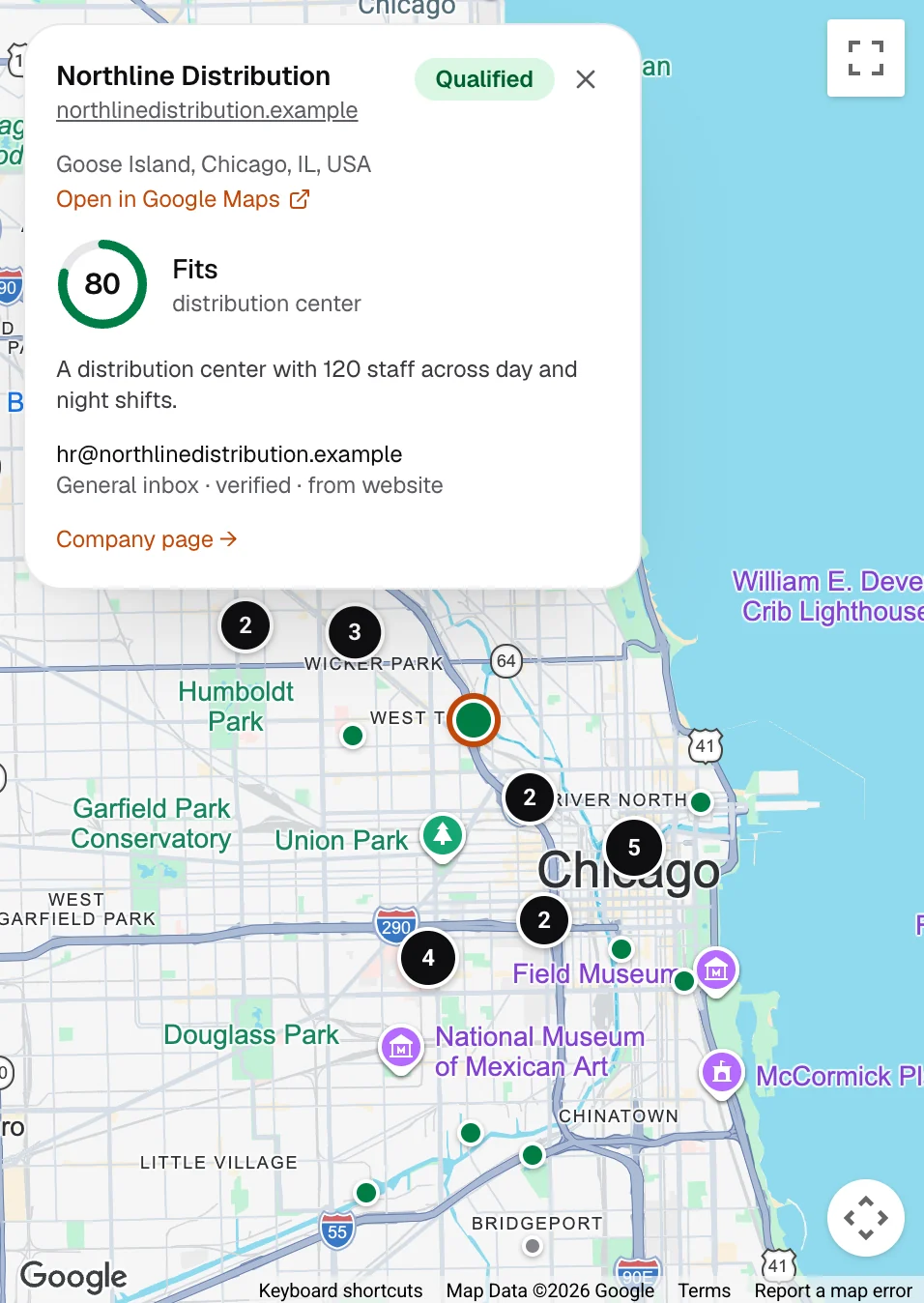
Foxfind finds the businesses on Google Maps, reads each one’s own website and asks the AI whether it suits your machines. The ones that fit turn green on the map, with the reason and the email it found.
- A fit score and the reason for each place, with quotes from its website
- The email comes from the business’s own website, checked before anything is sent
- Places that don’t fit, or have no email, are set aside and never contacted
Connect your inbox. The AI writes, you approve, it sends.
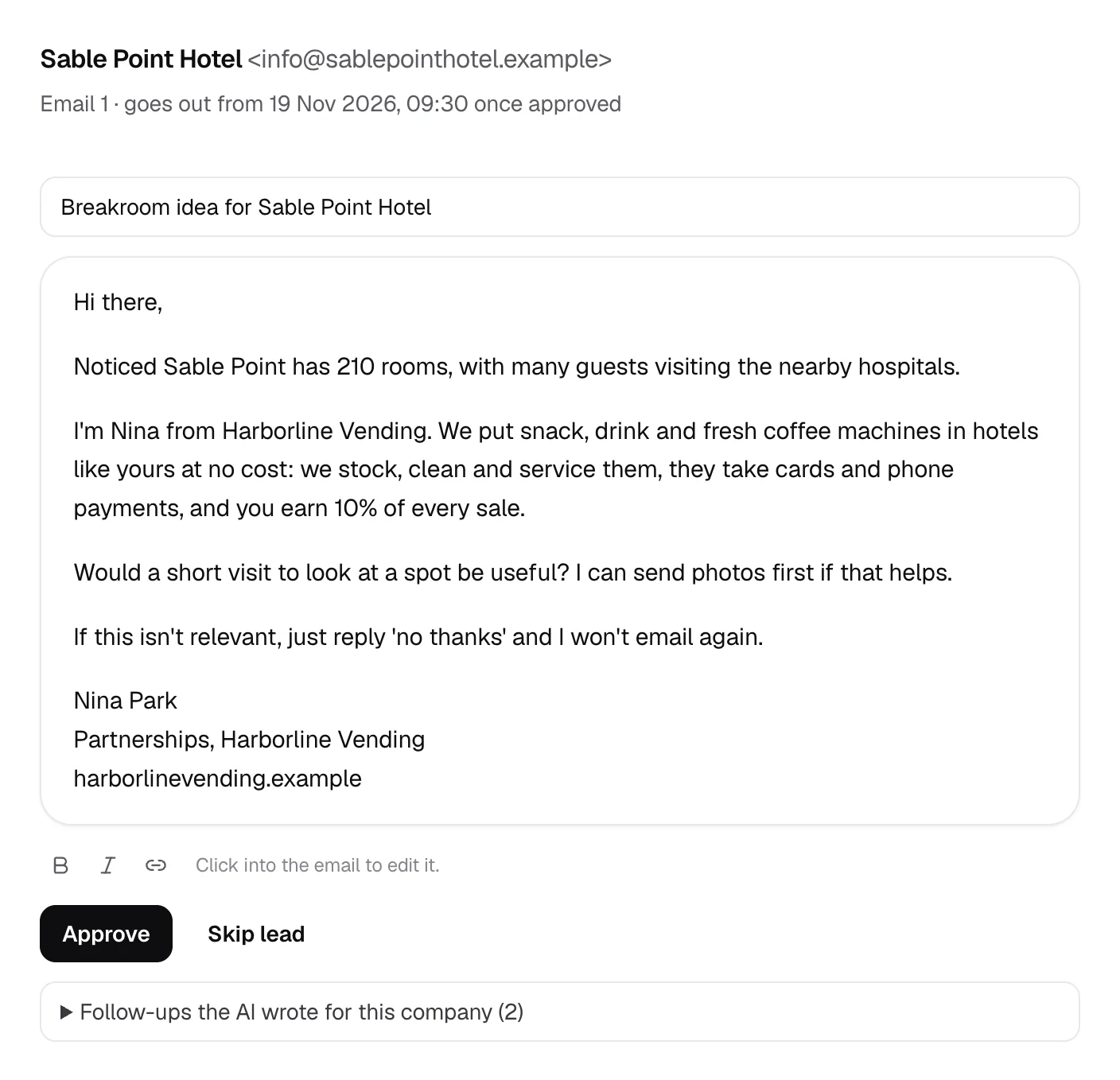
Connect Google Workspace, Microsoft 365 or any mailbox. The AI writes every email from your brief and what the venue’s own website says. Approve the first ones yourself, then switch the agent to Autopilot and it sends every email and follow-up for you.
- Follow-ups go out as replies in the same thread, a few business days apart
- When a venue replies, its emails stop and the reply lands in your inbox
- Interested replies are marked, so you know who to call first
What you get
A reason for every place, and an email worth reading.
Autopilot
Switch it on. Step in when a venue replies.
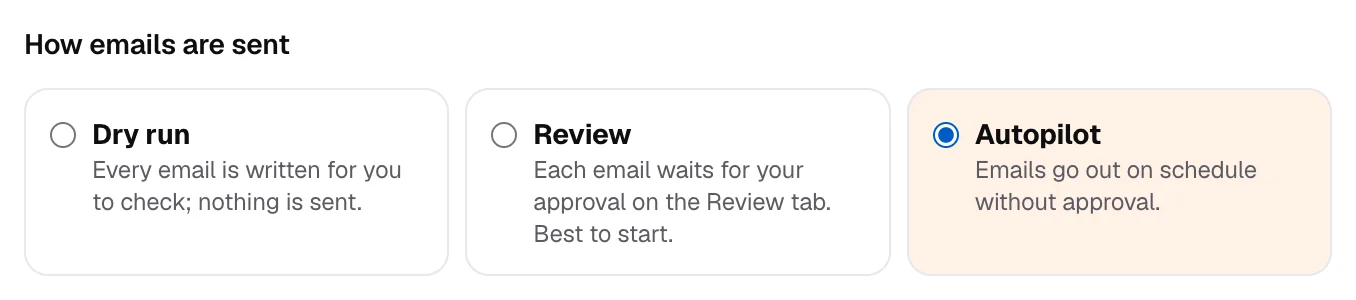
Approve the first emails yourself. When they read right, switch the agent to Autopilot: it sends every first email and every follow-up for you, from your own mailbox, and Foxfind emails you as soon as a venue replies.
- 1First emails, sent for youInside your sending hours, within each mailbox’s daily limit.
- 2Follow-ups, sent for youAs replies in the same thread, a few working days apart.
- 3A reply stops itThat venue gets nothing more, and the reply waits in your inbox. Foxfind never answers for you.
Safe by default
Your name is on every email. Foxfind treats it that way.
Your mailbox, your domain
Emails go out from addresses you own, through your own provider. Nothing is sent from a shared server.
A safe pace
At most 50 emails a day from each mailbox, starting lower and rising slowly, only in your working hours.
Plain and personal
Plain text, no tracking pixels, no images and at most one link: like an email you’d write yourself.
You approve first
New agents start in review: every email waits for your OK until you switch on Autopilot.
Replies come to you
A reply stops the emails to that venue, a bounce stops the address, and an out-of-office moves the next email. Foxfind never answers for you.
Easy to say no
Every email says how to opt out, and a venue that does is never emailed again.
New to sending from your own domain? Read how to connect a mailbox and set up SPF, DKIM and DMARC.
Where to look
Search the places your machines already sell in.
Type them as you would into Google Maps. The AI then checks each place against your own rules: how many people are there, for how long, and what is already nearby.
Read the guide: how to find vending machine locations- Office buildings
- Coworking spaces
- Gyms and fitness studios
- Car dealerships
- Auto repair shops
- Hotels
- Hospitals and clinics
- Warehouses and distribution centers
- Factories
- Apartment buildings
- Sports centers
- Bowling alleys
- Laundromats
- Colleges
Pricing
Start free. Pay for leads, not for searching.
1 credit = 1 lead: a place where Foxfind finds a verified email, counted once. The free trial runs for 14 days; plans start at $49 a month.
Questions
What vending operators ask.
Where do the businesses come from?
From Google Maps, through Google’s official Places API: the same listings people see when they search the map. Foxfind never scrapes Google.
Will it email places that aren’t a good fit?
No. The AI checks every business against your description of a good fit, and only those at or above your minimum score are written to. While an agent is in review, nothing goes out until you approve it.
Do I have to approve every email?
No. New agents start in review, so you can read the first emails and adjust the brief. Then switch the agent to Autopilot in its settings: it sends every first email and follow-up on its own, inside your sending hours and each mailbox’s daily limit, and Foxfind emails you as soon as a venue replies. Autopilot comes with every paid plan; on the free trial you approve each email.
Whose email address are the emails sent from?
Yours. You connect your own mailbox (Google Workspace, Microsoft 365, Zoho or any provider with SMTP and IMAP), and replies arrive there as well as in Foxfind’s inbox.
How many emails does it send a day?
At most 50 a day from each mailbox, and fewer while a new mailbox warms up. To reach more places, connect more mailboxes rather than pushing one harder.
Does it work outside the US?
Yes. It works wherever Google Maps lists businesses: draw your areas on the map anywhere in the world.
What happens when a venue replies?
Its emails stop at once and the reply lands in your Foxfind inbox, sorted by what it says: interested, a question, someone else to ask, or not interested. Foxfind never replies on your behalf.
How is it priced?
1 credit = 1 lead: a business where Foxfind finds a verified email, counted once however many emails it gets. You only use a credit when we find an email. Plans also include a number of emails a month; see the pricing page for both.
Your next locations are already on the map.
Enter your website: the AI reads it, drafts who to target and what to say, and you pick the areas.