What makes a good vending location
Every operator has a feel for a good spot. It pays to write yours down: it becomes the description you check every candidate against, whether you do that yourself or let software do it for you.
People who stay
The best locations have people who are there for hours, not minutes: staff in an office or a warehouse, members at a gym, customers waiting for their car to be serviced, guests in a hotel. A busy shop where people come and go in five minutes often sells less than a quiet office where eighty people work all day.
Nothing better nearby
A café on the ground floor, a convenience store across the street or a staff canteen all compete with you. Places that are open early, late or at weekends, when everything around them is closed, are worth more than their size suggests.
The right products for the place
Snacks and cold drinks suit warehouses, dealerships and offices. Good coffee suits offices, waiting rooms and coworking spaces. Water and protein snacks suit gyms. If you run more than one kind of machine, note which places suit which.
The practical details
A machine needs floor space near a power outlet, a way in for restocking, and a signal for card payments. Ask early: a perfect lobby without an outlet isn’t a location.
Someone who can say yes
Large buildings are usually run by a property management company; offices have an office or facilities manager; gyms, hotels and dealerships have a general manager; small businesses have an owner. Knowing who decides tells you who to write to.
The usual ways to find locations, and where they fall short
- Driving around and walking in. You see the place for yourself, which is valuable. It is also slow, and the person at reception is rarely the one who decides.
- Cold calling. Quick to start, but front desks screen calls, and you’re asking someone to decide about a machine they can’t see.
- Locating services. A locator finds and signs places for you, for a fee. Useful when you’re short of time, but you give up choosing where your machines go.
- Bought lists. Rarely local enough, often out of date, and they say nothing about whether a business suits a machine.
- Referrals. The best leads there are, but you can’t schedule them.
All of these start from the same question: which businesses near me are worth asking? That is where Google Maps comes in.
Why Google Maps is the best map of vending locations
Almost every business with a front door is on Google Maps, and that makes it the most complete list of possible locations there is:
- It is organised by kind of place. Searching for “gym” or “car dealership” in an area gives you exactly the categories that buy vending.
- It stays current. Businesses update their own hours and details, and closed places are marked as closed.
- It links to each business’s website, which tells you how big the place is, when it’s open and how to get in touch.
- Reviews hint at traffic. A place with hundreds of reviews sees a lot of people; one with three may not.
The catch is the work. One search for “office building” in a large city returns far more places than you can look through, few listings have an email address, and many won’t suit a machine. Copying listings into a spreadsheet by hand takes days, and scraping Google Maps with a bot breaks Google’s terms. The rest of this guide shows how to get the benefit without the busywork.
How to find vending locations with Foxfind, step by step
Foxfind does this job from start to finish: it finds businesses on Google Maps through Google’s official API, checks each one against your description of a good location, finds an email on the business’s own website and sends your emails, with follow-ups, from your own mailbox.
The screenshots come from a demo account for an invented business, Harborline Vending, which places snack, drink and coffee machines in Chicago. The companies and people in them are made up; the steps are the same in any city.
Step 1: Describe what you place, and where
Start by telling the assistant what you do, the way you’d tell a friend. For example: “I run snack, drink and coffee vending machines in Chicago. We install and stock them for free and share 10% of sales. Find offices, gyms and car dealerships where I could place them.”
The assistant proposes an agent: the searches to run on Google Maps, a description of a good fit, kinds of places to skip, an area on the map and a brief for your emails. Where it doesn’t know something, like your phone number or a customer you could mention, it leaves a marked gap for you to fill in instead of inventing it. Nothing happens until you click to create the agent.
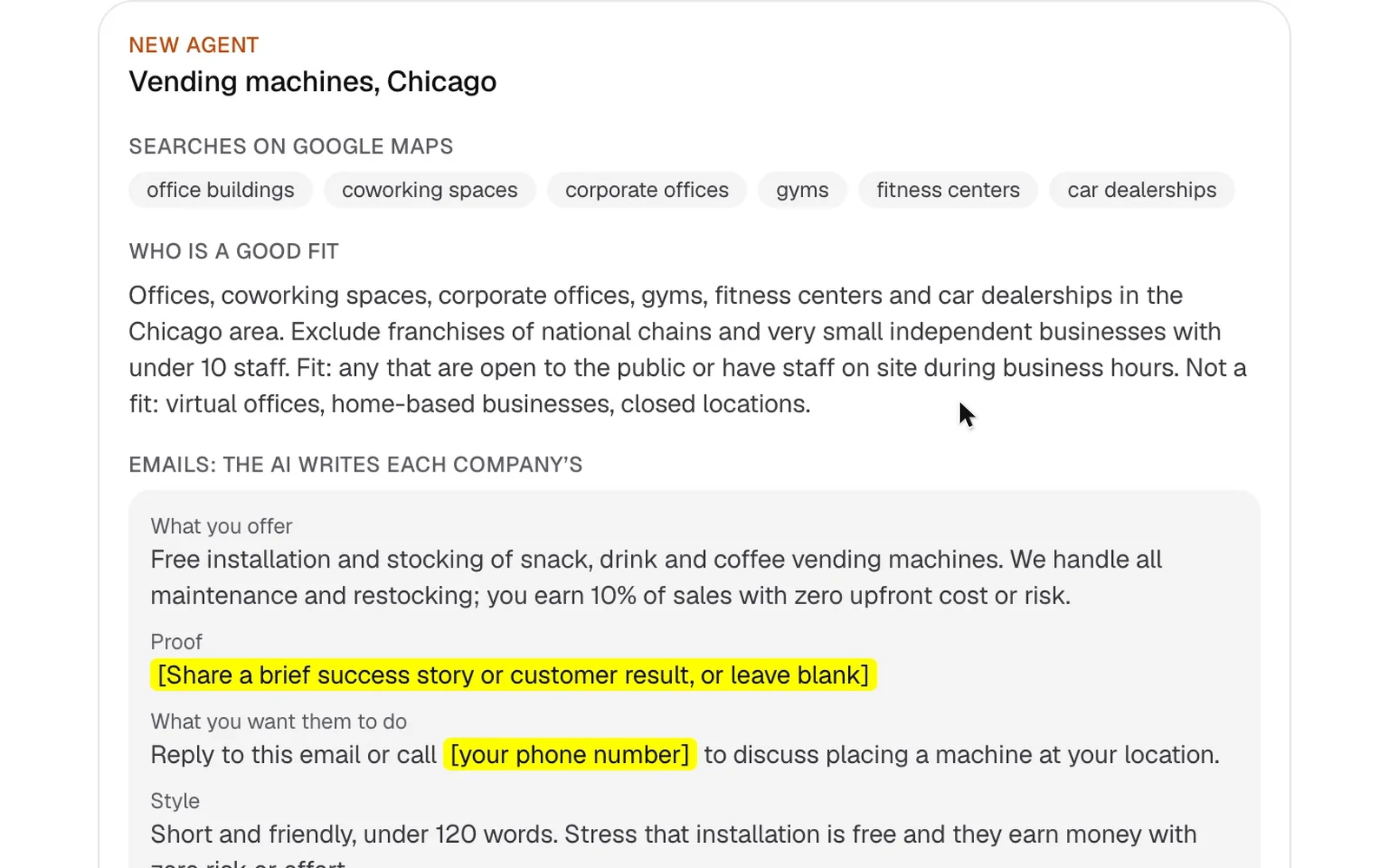
Prefer to start from your website? Enter it on a new agent, and the AI reads your site and drafts the same things from what it says.
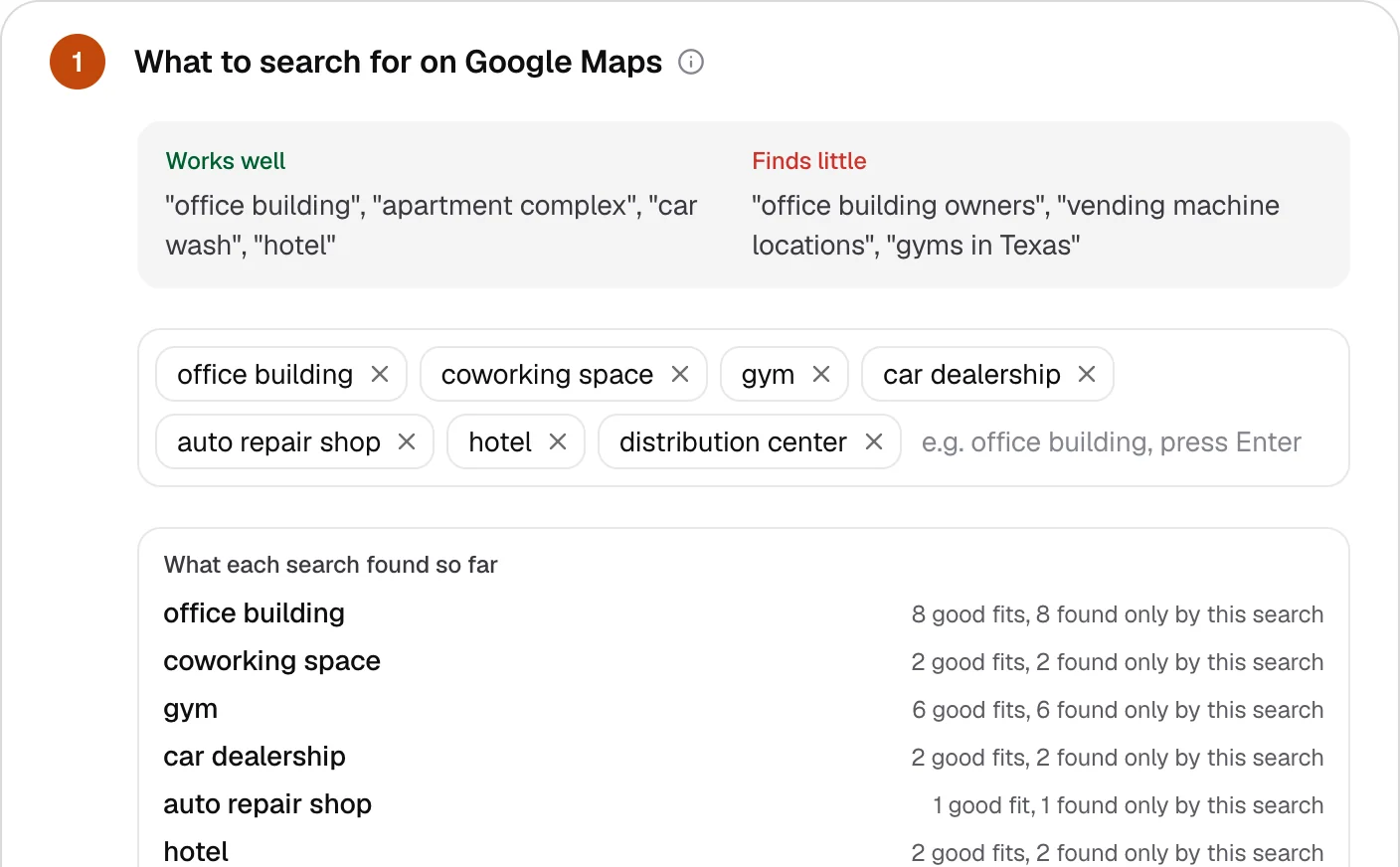
Step 2: Choose what to search for
Use the words people type into Google Maps: “office building”, “coworking space”, “gym”, “car dealership”, “auto repair shop”, “hotel”, “distribution center”. Avoid phrases that describe you instead of them (“vending machine locations”) or that add a place (“gyms in Chicago”): the map already takes care of where.
Then list what to skip. Cafés, restaurants and convenience stores sell what you sell; leaving them out keeps the list clean before anything is checked.
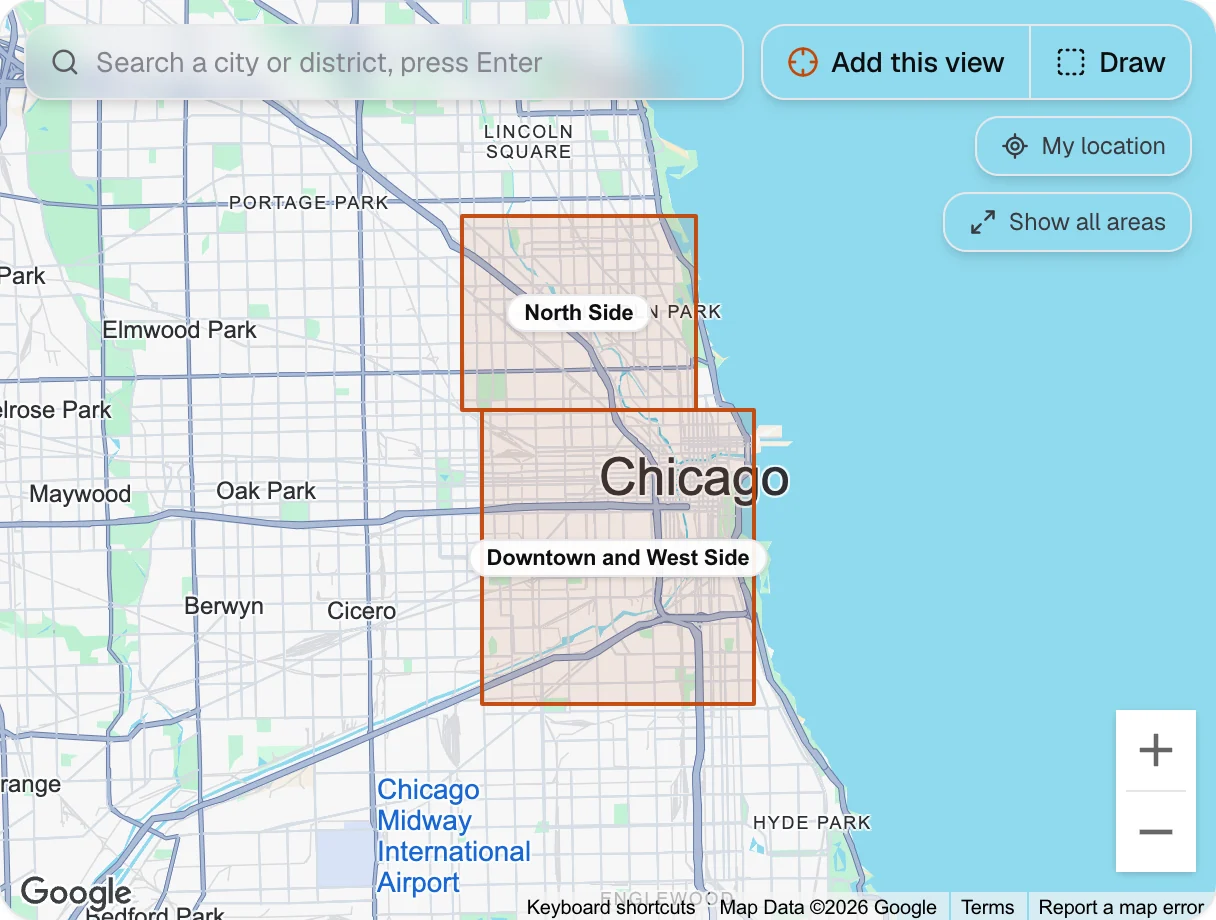
Step 3: Draw your areas on the map
Drag a box over each part of your route, give it a name and adjust its corners. Start where you already restock: a location next to your route is worth more than a perfect one an hour away.
Step 4: Describe a good location
This is where your notes from the first section go: how many people are on site, when, what is nearby, and what to avoid. The AI reads each business’s own website and scores it against this description from 0 to 100, with its reason and quotes from the site. Harborline’s reads:
“Workplaces and venues in Chicago where at least 30 people spend time every day and would buy a snack, a cold drink or a coffee: office buildings and coworking spaces, gyms and sports centers, car dealerships and repair shops with waiting areas, hotels, and warehouses or distribution centers with staff on shifts. Not cafés, restaurants or convenience stores, not schools, not small shops.”
Set a minimum score as well. Places that fit but score below it are kept and shown, but never emailed.
Step 5: Run discovery and look at the map
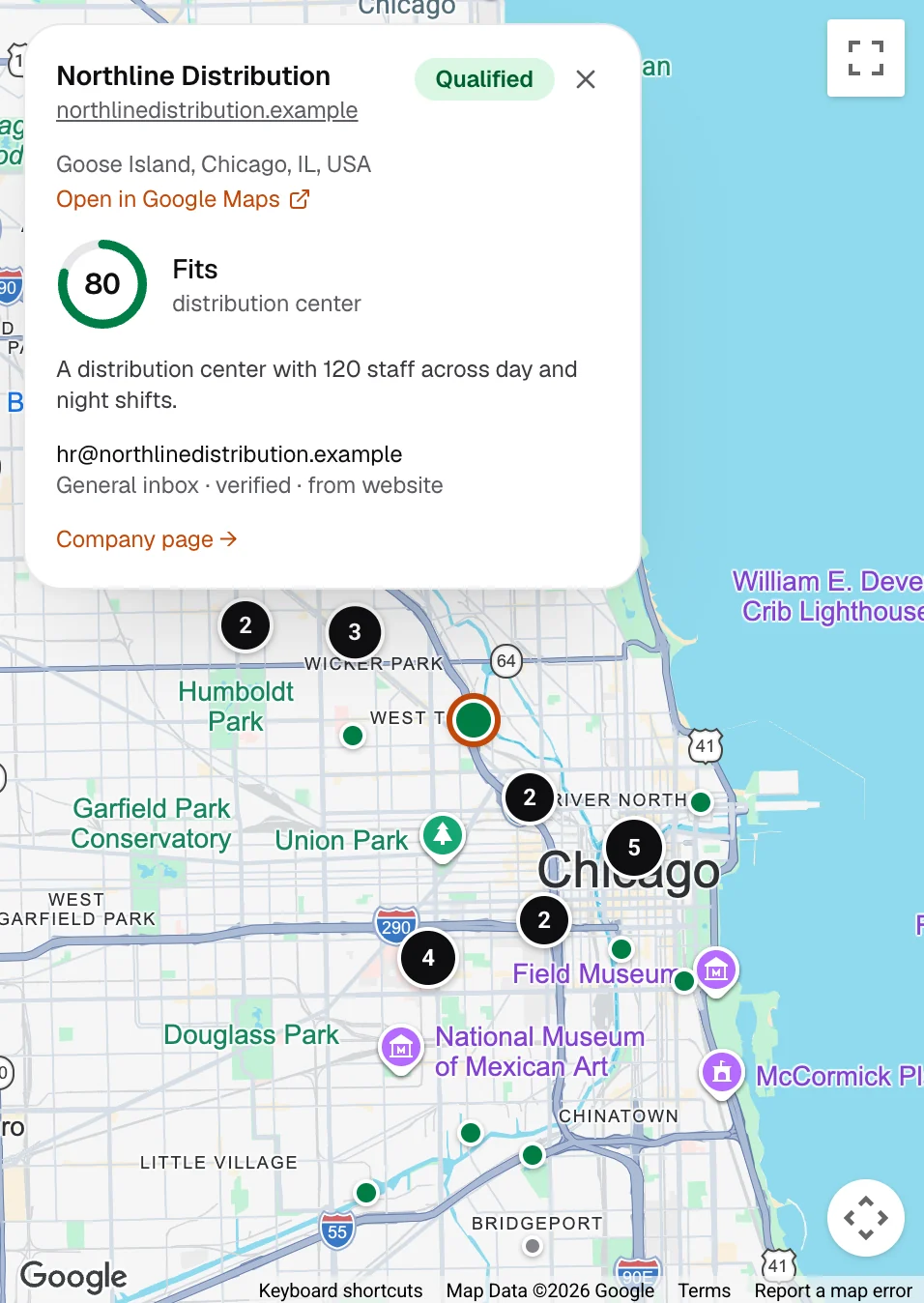
Click Run discovery. Foxfind searches each area for each search, visits the websites of the businesses it finds, looks for an email address, and asks the AI whether each place fits. The results land on a map, coloured by fit: fits, fits under your minimum, unsure, not a fit, and no email yet.
A discovery run, sped up: the map fills in as each company is checked.
Click a pin to see why: the score, the reason in plain words and the email Foxfind found, with where it found it. You only use a credit when we find an email. During the free trial, only companies the AI says fit use a credit.
Step 6: Let the AI write the emails
Fill in the brief: what you offer, proof you can mention, and what you want the venue to do. The AI writes each email from this brief and what that venue’s own website says, and nothing else: a number or a link that isn’t in its input is rejected, so it can’t promise what you don’t offer.
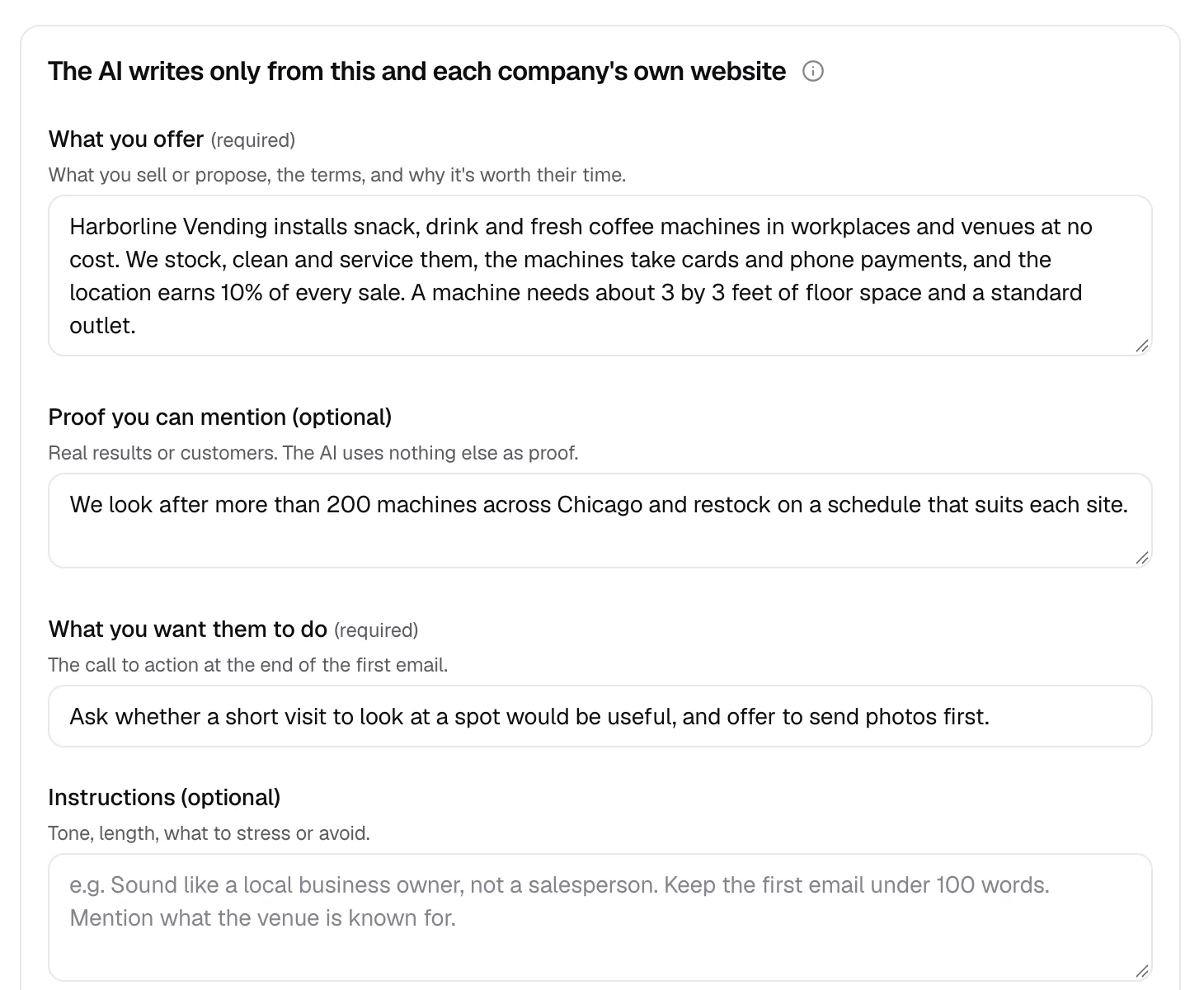
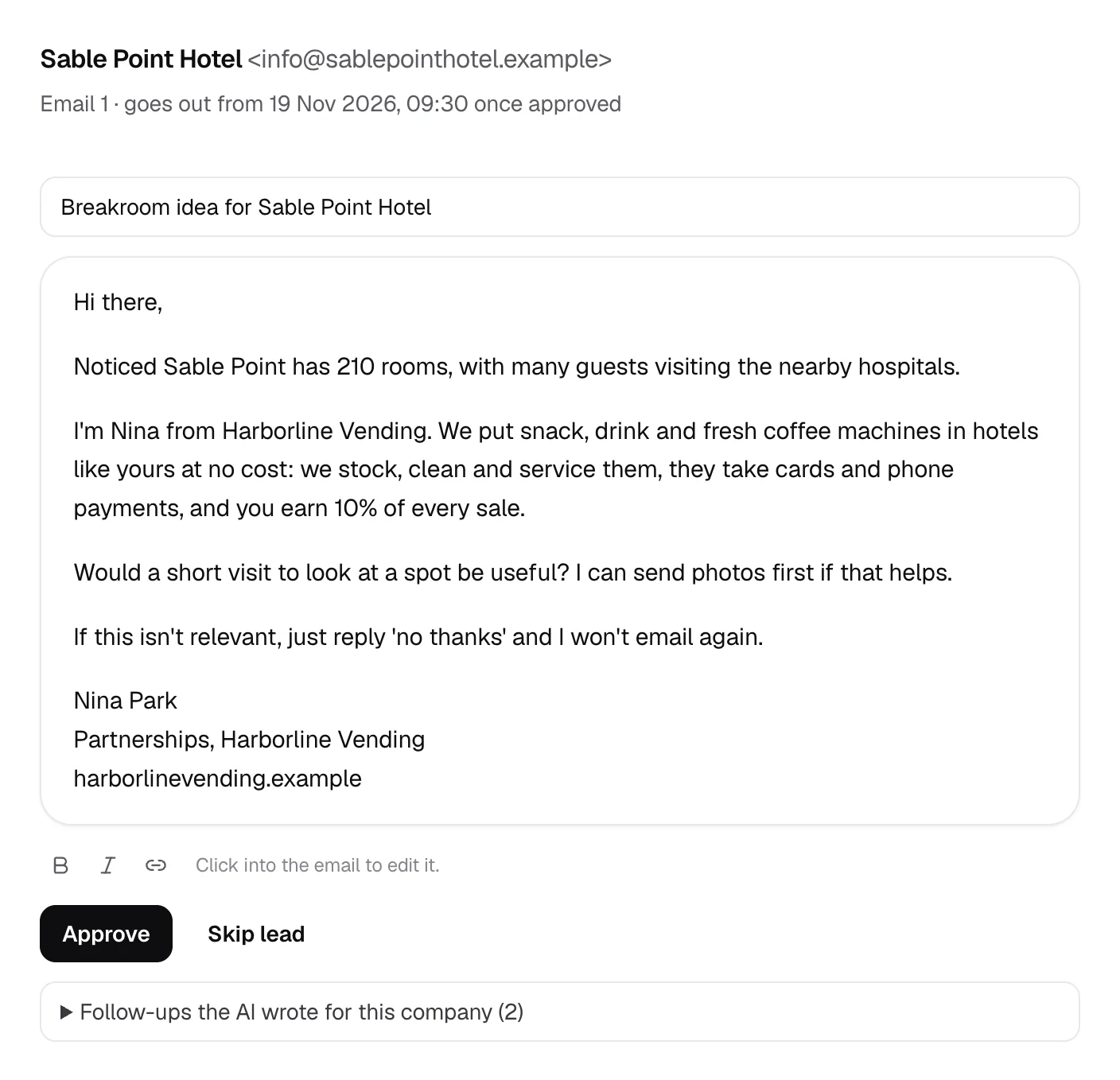
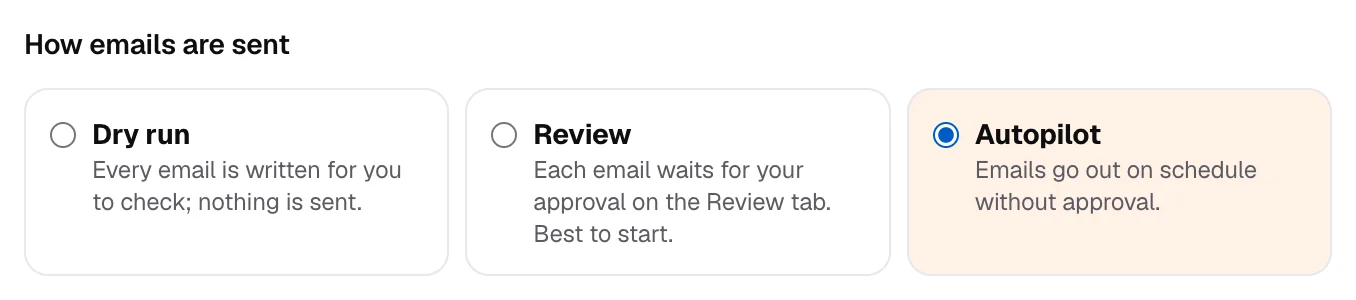
New agents start in review: every email waits for your approval, so you can read the first ones and adjust the brief.
Step 7: Connect a mailbox and launch
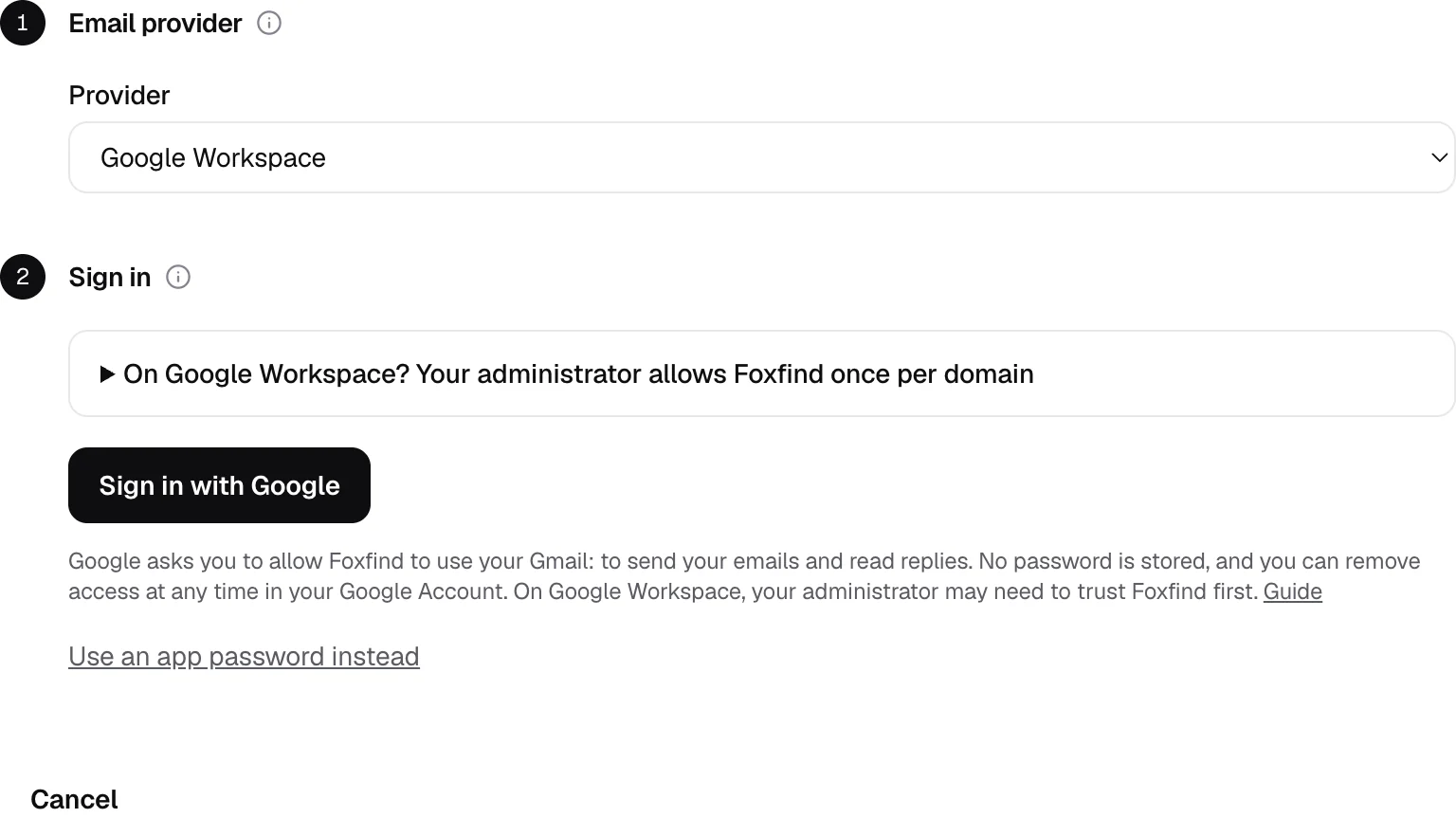
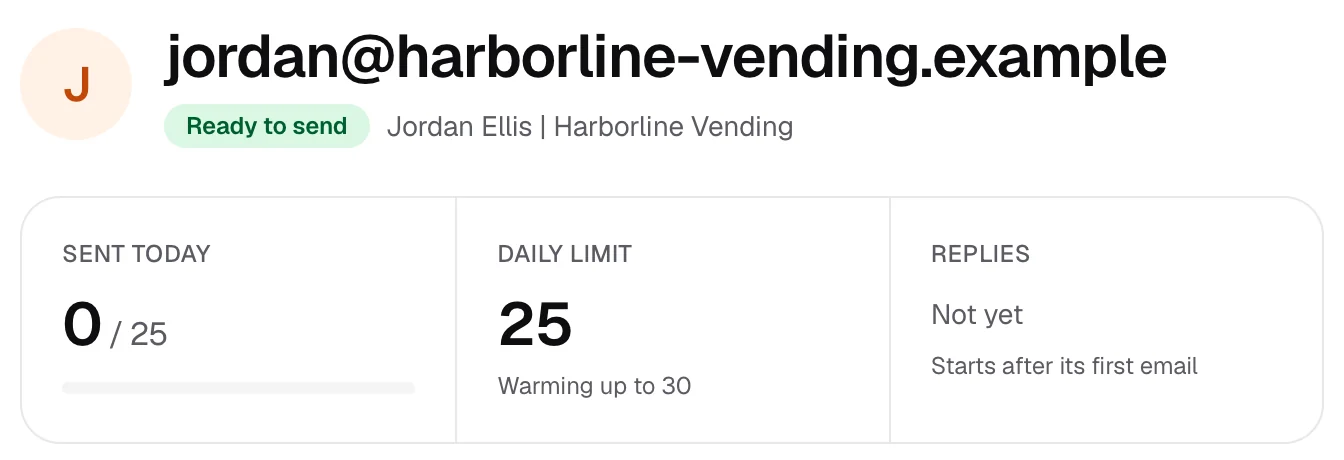
Connect the mailbox you’ll send from: Google Workspace (sign in with Google, or use an app password), Microsoft 365 or Outlook, Zoho, or any provider with SMTP and IMAP. Foxfind checks your domain’s records and shows each mailbox’s daily limit, which starts low and rises step by step.
Step 8: Switch on autopilot
Once the emails read the way you want, open the agent’s settings and choose Autopilot under “How emails are sent”. From then on the agent sends every first email and every follow-up for you: inside your sending hours, within each mailbox’s daily limit, with follow-ups as replies in the same thread. You stop approving, and Foxfind emails you as soon as a venue replies. You can switch back to review at any time. Autopilot comes with every paid plan; on the free trial, each email waits for your approval.
Step 9: Answer the replies
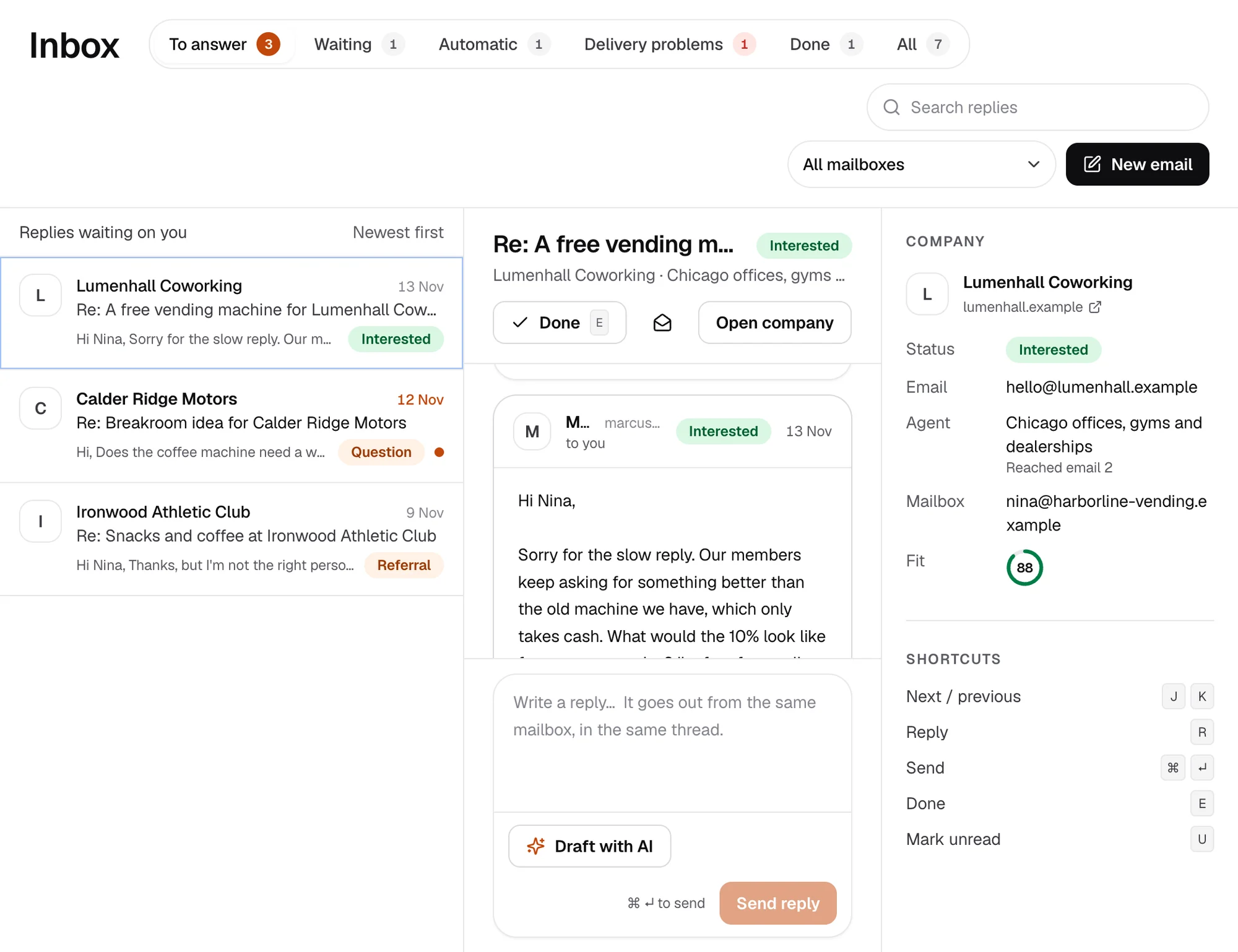
Follow-ups go out as replies in the same thread a few business days apart. When a venue replies, its emails stop at once and the reply lands in Foxfind’s inbox, sorted by what it says: interested, a question, someone else to ask, or not interested. Out-of-office replies move the next email until the person is back, and bounces are removed. Foxfind never answers for you; that part is yours.
How to write a vending pitch that gets replies
- Start with them. One specific, true line about their place, taken from their website: the number of floors, the opening hours, the waiting room.
- Say what they get. A perk for staff or customers, no cost, no work for them and, if you offer it, a share of sales.
- Ask for one small thing. A short visit to look at a spot, or whether you can send photos. Not a contract, not a call.
- Keep it short. Five or six sentences. If it needs scrolling on a phone, it is too long.
- Follow up twice, in the same thread, a few business days apart, each time adding one new detail rather than “just checking in”.
Here is the first email from the demo, for an invented office building:
Subject: Snacks and coffee at Westbrook Commons

Hi there,

Saw that Westbrook Commons has 24 floors of offices, and the lobby café closes at 2pm.

I'm Jordan from Harborline Vending. We put snack, drink and fresh coffee machines in offices like yours at no cost: we stock, clean and service them, they take cards and phone payments, and you earn 10% of every sale.

Would a short visit to look at a spot be useful? I can send photos first if that helps.

If this isn't relevant, just reply 'no thanks' and I won't email again.

Jordan Ellis
Partnerships, Harborline Vending
Mailbox best practices: keep your emails out of spam
The fastest way to waste a good list is to send it from a mailbox that lands in spam. These habits protect your domain and your replies:
- Send from a separate domain. Register a second domain for outreach (say yourbrand-mail.com next to yourbrand.com) and keep your main domain for customers and invoices. If something goes wrong, your everyday email isn’t affected.
- Set up SPF, DKIM and DMARC. These DNS records prove an email really comes from you. Google’s sender guidelines ask every sender to set up SPF or DKIM, and anyone sending in volume to Gmail to have all three. Our mailbox guide shows the records for each provider.
- Start slowly. A new mailbox should send a few emails a day and build up over weeks. Foxfind starts each mailbox low and raises its limit step by step, never above 50 a day.
- Spread the volume. Two or three mailboxes sending a few dozen emails each look more natural than one sending a hundred.
- Write like a person. Plain text, no images, no attachments, at most one link and no tracking pixels. Foxfind sends every email this way.
- Send in business hours, in your time zone, on weekdays: the agent only sends inside the window you set.
- Only email addresses you’ve checked. Bounces hurt your reputation. Foxfind takes addresses from the business’s own website, checks that the domain accepts email, and stops using an address for good after a hard bounce.
- Make it easy to say no, and respect it. Every email should say how to opt out, and an opt-out is final. In the United States, commercial email must also carry a valid postal address. Foxfind adds your opt-out line to every email, and your postal address once it’s in your settings.
- Stop when they reply. A follow-up after someone has answered is the quickest way to annoy them. Foxfind stops a company’s emails as soon as anyone there replies.
From reply to placement
A reply that says “tell me more” is the start of the conversation, not the end. The rest usually happens in person:
- Answer quickly. Interest fades, and the person who replied may be asked about something else tomorrow. Suggest two times for a short visit.
- Check the spot. Floor space, an outlet within reach, a clear path for a hand truck, and somewhere people actually walk past, not a corner nobody uses.
- Put the details in writing. One page is enough: where the machine goes, who pays for power, what the location receives and when, how often you restock, how to report a problem, and how much notice either side gives to remove it.
- Make it easy to say yes. Some locations agree more readily to a trial of a few months than to an open-ended arrangement.
- Ask for an introduction. A property manager who likes the result may look after other buildings, and a happy gym owner knows other gym owners.
Questions
What are the best places to put a vending machine?
Places where people stay for hours and can’t easily buy what you sell: office buildings and coworking spaces, warehouses and factories with shift work, gyms, car dealership service lounges, auto repair shops, hotels, hospitals and clinics, apartment buildings and laundromats. Check each one: a busy place with a café on the ground floor is often worse than a quiet one with nothing nearby.
Do I need permission to place a vending machine?
Yes. You need the agreement of whoever controls the space, usually the owner or property manager, ideally in writing: where the machine goes, power, access for restocking and what the location receives. Licences, permits and sales tax rules vary by city, state and country, so check the rules where you operate.
Do I have to approve every email Foxfind writes?
No. New agents start in review, so you can check the first emails and adjust the brief. When they read right, switch the agent to Autopilot: it sends every email and follow-up on its own, within your sending hours and each mailbox’s daily limit, and Foxfind emails you as soon as a venue replies. Autopilot comes with every paid plan; on the free trial you approve each email.
Should I offer the location a commission?
Many operators share a percentage of sales with the location; others offer the machine as a free perk for staff or customers. Whatever you offer, say it in the first email, so the person can say yes without a call to find out.
Is it legal to email businesses about vending machines?
In the United States, commercial email is governed by the CAN-SPAM Act: no misleading headers or subject lines, a clear way to opt out that you honor, and a valid postal address. Other countries have their own rules. Write to the address a business publishes for enquiries, keep the email relevant, and stop when asked.
Can I use Google Maps data to find locations?
Yes, through Google’s official Places API, which is what Foxfind uses. Scraping Google Maps, by copying listings with a bot, is against Google’s terms of service.
Find your next locations on the map
The free trial includes 50 credits and 250 emails. Enter your website to start.